Let me be honest with you — I spent more time than I’d like to admit hunting for a single cloud PNG last month.
I was throwing together a YouTube thumbnail at 1 AM, deadline looming, and I just needed a clean transparent cloud image. No watermarks. No sketchy download buttons. No “sign up to get your free download” traps. What I got instead was a 45-minute rabbit hole across seven different websites, most of which either had garbage quality, required a login, or buried the actual download behind three ads and a CAPTCHA maze.
That frustrating night is exactly why I sat down and properly tested 15 PNG websites — not just clicked around for two minutes, but actually searched, filtered, downloaded, and checked the files. Here’s what I found.
Why PNG Specifically?
Before I get into the list, quick note for anyone new to this: PNG files keep a transparent background, which is why designers, YouTubers, and educators love them. You can drop a PNG of a flame, a cloud, or a logo onto any background and it just… fits. JPEGs don’t do that — they always come with a white box around them.
Okay, onto the sites.
1. CleanPNG — Massive Library, Easy to Navigate
Website: www.cleanpng.com
CleanPNG was one of the first sites I bookmarked, and for good reason. It has over 12.6 million PNG resources, which sounds overwhelming, but the site handles it well with a proper category system.
What I actually liked: the “Table of Contents” section on search results pages. When I searched for “cloud,” it didn’t just dump 400 images on me — it broke them down by category. Abstract Cloud, Cartoon Cloud, Dreamy Cloud — each with its own subcategory and image count. Super helpful when you know the style you want but not the exact keyword.
Downloads are free and usually don’t require a login. Occasionally you’ll hit a CAPTCHA — just drag the shape into the matching outline and you’re through. Took me about 10 seconds. Not a dealbreaker.
Best for: General use, large variety, no-account browsing.
2. PNGFile — Commercial Use Without Attribution Headaches
Website: www.pngfile.net
Here’s one that surprised me. PNGFile isn’t the flashiest site, but it openly states that their images can be used for commercial projects without attribution requirements. That’s actually rare, and it matters if you’re doing client work or monetized content.
The collection isn’t as huge as some others, but the search results are clean. You can pick between Small, Medium, and Large file sizes right on the download page — no hidden upsell. I grabbed a black cloud PNG for a project and it downloaded in seconds, sharp and ready to use.
Best for: Commercial projects where you don’t want to worry about crediting anyone.
3. PNGImg — 116,000+ Files, Beautiful Quality
Website: www.pngimg.com
PNGImg has a well-organized setup — alphabetical browsing, clear categories, and a solid search bar. The image quality here genuinely impressed me. Some of the resolutions I came across were professional-grade, the kind you’d expect to pay for elsewhere.
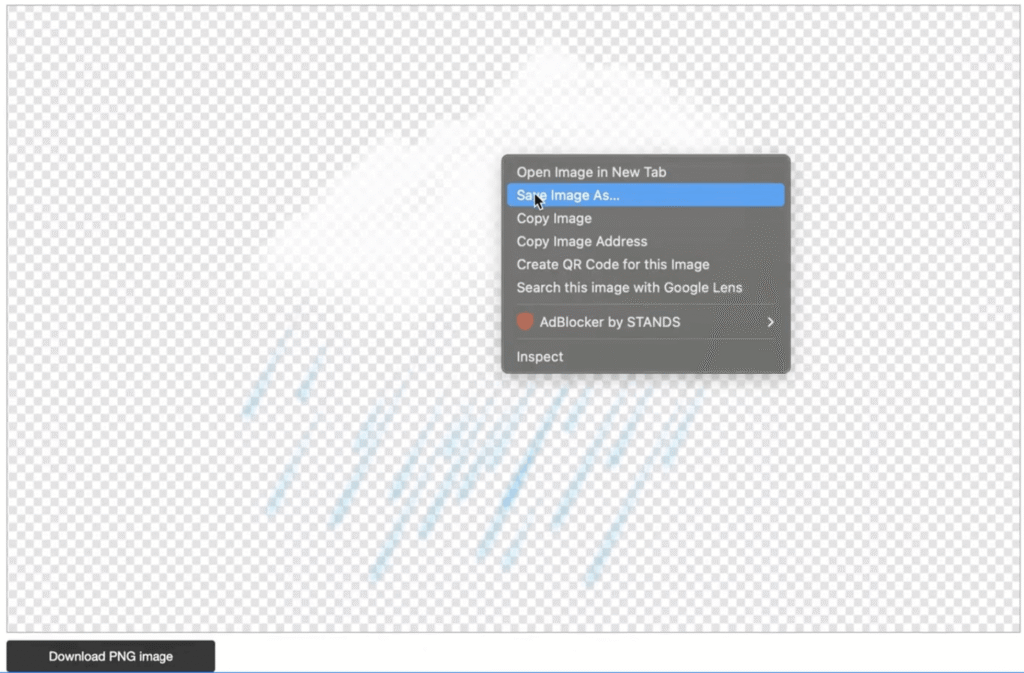
One small quirk: the “Download PNG Image” button didn’t always work for me on the first click. Instead of fighting it, I just right-clicked the image and hit “Save Image As.” It’s a tiny workaround but worth knowing so you don’t think the site is broken.
Best for: High-resolution PNG files with great image quality.
4. PNGWing — Resolution and File Size Visible Before You Click
Website: www.pngwing.com
PNGWing has a feature I wish more sites would copy: you can see the image resolution and file size right in the search results, before even opening the image. That alone saves a ton of time when you’re comparing options.
The site also shows related tags and keywords on each image page, which helps when you’re trying to find variations of something.
One thing to keep in mind — PNGWing is better suited for personal, educational, or non-commercial use. For commercial projects, double-check the licensing or reach out to them. Some images have restrictions that aren’t immediately obvious.
Best for: Browsing efficiently when you want to compare resolution before downloading.
5. PNGAll — Smart Related Search Suggestions
Website: www.pngall.com
What sets PNGAll apart is how it handles search suggestions. When I searched “cloud,” it didn’t just show me cloud images — it also suggested Rain Cloud, Thunder Cloud, Storm Cloud, and other related terms. Sounds minor, but when you’re in design mode and looking for inspiration, that kind of nudge is genuinely useful.
Hover over any image thumbnail to see the dimensions and file size. Then click through to download for free. The quality is solid and the site is beginner-friendly.
Best for: Discovering related PNG styles you didn’t know you were looking for.
6. PNGEgg — Fastest Downloads of the Bunch
Website: www.pngegg.com
PNGEgg is similar in layout to several other sites on this list, but one thing stood out: download speed. I clicked “Download PNG for Free” and the file was on my desktop almost instantly. No countdown timers, no pop-ups, no drama.
The quality is decent — not the highest resolution I found, but reliable and consistent. If you need something quick without fuss, PNGEgg earns its spot.
Best for: Speed. When you just need the file now.
7. PNGKey — 1.1 Million Files with Real Filtering
Website: www.pngkey.com
PNGKey bills itself as one of the largest transparent PNG collections online, and with over 1.1 million files, it’s hard to argue. What makes it more useful than just “big” is the filtering system on the left sidebar: filter by size (Large, Medium), image type, and even specific color combinations.
When I searched “cloud,” I got over 2,500 results. The filters helped me narrow that down in about 30 seconds. Each thumbnail also shows the resolution and download popularity, which is a nice quality signal — if thousands of people downloaded something, it’s probably decent.
Best for: Large-scale searches where you need filtering to stay sane.
8. FavPNG — Millions of Options, Wide Asset Variety
Website: www.favpng.com
FavPNG leans more toward a full design asset platform than just PNG images. Logos, calendars, templates, backgrounds — it’s all there. But the PNG collection is massive too. My “cloud” search came back with over 40,000 results.
The download has a countdown timer (about 10 seconds) before the file starts. Mild annoyance, but manageable. For free downloads, attribution may be required depending on the specific file. Premium plans remove those restrictions for commercial use.
Best for: Variety-seekers who want one platform for multiple design asset types.
9. KindPNG — Clean Interface, Smart Filters
Website: www.kindpng.com
KindPNG offers around 2 million transparent PNG files and does a good job making them browsable. The three main filters — size, orientation, and color — are front and center on every search results page, not buried in a sidebar menu.
Downloads are straightforward: click the image, click “Free Download,” done. The files I tested came out with clean transparent backgrounds and good clarity for design work.
Best for: A clean, no-clutter experience with quick access to filters.
10. StickPNG — Simple, Clean, No Noise
Website: www.stickpng.com
StickPNG’s biggest strength is its simplicity. The interface is clean, the search works well, and the preview shows the image on a transparent background so you know exactly what you’re getting before you download it.
There’s a short countdown timer on downloads (around 10 seconds), then the file saves automatically. Nothing revolutionary here — just a solid, reliable site that does what it says.
Best for: Users who get overwhelmed by busy interfaces and just want something simple.
11. Magnific AI — Not Your Typical PNG Site
Website: www.magnific.com
This one’s a bit different. Magnific AI isn’t a library of pre-made PNGs — it’s an AI-powered tool that upscales and enhances images. So if you’ve grabbed a PNG from somewhere else and the resolution is too low for your project, Magnific can sharpen it up significantly.
You do need to create an account to use it, and some features are behind a paid plan. But the quality of the AI enhancement is genuinely impressive — small, soft images come out looking sharp and detailed. Worth knowing about even if you don’t use it every day.
Best for: Enhancing the quality of PNGs you already have, not finding new ones.
12. Rawpixel — Professional Design Assets with Attribution-Free Options
Website: www.rawpixel.com
Rawpixel stands out because many of its free resources don’t require attribution — which is genuinely uncommon. The library covers photos, vectors, illustrations, mockups, and PNG files all in one place.
Search quality is good, and filtering by file type (PNG, JPG, vector, etc.) is straightforward. The free images I downloaded came through quickly and at solid resolution. If you’re a designer who uses multiple asset types, Rawpixel reduces how many tabs you need to have open.
Best for: Designers who need PNG images alongside other asset types in one place.
13. PNGTree — The Biggest Library on This List
Website: www.pngtree.com
PNGTree is enormous — over 30 million design assets, including PNG images, vectors, backgrounds, templates, and even PowerPoint slides. It also has an AI PNG Maker built in. For scale alone, nothing else on this list comes close.
That said, you need to sign in to download anything. Free plan gives you a limited number of daily downloads with attribution requirements. Commercial use needs a paid plan (Individual Premium or Enterprise). Hover over any image on the search page to instantly see whether it’s free or premium before you click.
For personal or educational projects, the free tier works fine. For client work, weigh the cost of upgrading — it might actually save you time versus hunting across ten other sites.
Best for: Finding almost anything PNG-related in one massive, well-organized library.
14. Vecteezy — Vector-First, But PNG Options Are Solid
Website: www.vecteezy.com
Vecteezy is primarily a vector platform, but it has a strong PNG section too. The filtering is detailed — you can narrow by license type, content type, AI-generated vs. human-made, orientation, and color. Switching to the “Free License” filter in PNG mode gives you a clean set of truly free options.
The download labeled “Free Download – Attribution Required” is what you’ll see most often. That’s the trade-off for the free tier. If attribution is something you can include in your projects, Vecteezy is absolutely worth using.
Best for: Users comfortable with attribution who want detailed search filtering.
15. RawPNG — Simple and Gets the Job Done
Website: www.rawpng.com
RawPNG is the no-frills option on this list. The filtering is basic but functional — choose Free over Premium, select PNG as the file type, and you’ll get a manageable set of results. Resolution options vary; free downloads often land at a lower resolution, but for social media posts, website thumbnails, or presentation slides, it’s usually enough.
What I appreciated: no complicated account setup, no aggressive upsells during the download process. Straightforward site for quick needs.
Best for: Quick, low-barrier downloads when resolution isn’t your top priority.
Mistakes I Made (So You Don’t Have To)
Downloading without checking the license. I used a PNG from a site that required commercial attribution and didn’t notice until after the project was done. Always scan the licensing info on the image page, not just the site’s homepage.
Ignoring file size in the search results. Some “high-res” PNGs are actually quite small in file size, which means they’ll look blurry when scaled up. Wherever you can see the file size upfront (like PNGWing), check it before downloading.
Trusting the “free” label on every platform equally. On some sites, “free” means free with attribution. On others, it means completely free for any use. These are very different things. Read the fine print on each site you use.
Downloading from only one site. No single site is the best at everything. CleanPNG is great for variety, PNGFile is best for commercial use, PNGTree wins on sheer volume. Mix and match depending on your project.
Quick Reference: Which Site to Use When
| Need | Go To |
|---|---|
| Biggest variety, no login | CleanPNG |
| Commercial use, no attribution | PNGFile |
| Highest resolution | PNGImg |
| Browse by resolution before clicking | PNGWing |
| Over 30 million assets | PNGTree |
| Fastest downloads | PNGEgg |
| Enhance a low-res PNG | Magnific AI |
| Multiple asset types, one place | Rawpixel |
Final Thoughts
Honestly, after testing all 15 of these, I don’t think there’s one perfect site for everyone. It really depends on what you’re building and how you plan to use the image. If it’s personal or educational, most of these sites will serve you well for free. If it’s commercial work, pay attention to the licensing — PNGFile and Rawpixel are your safest bets without extra steps.
The one thing I’d tell anyone starting out: don’t just download the first result you find. Spend an extra 60 seconds checking the resolution, the file size, and the license. It saves a lot of headache later.
Now close the 14 other browser tabs you have open and go make something cool.